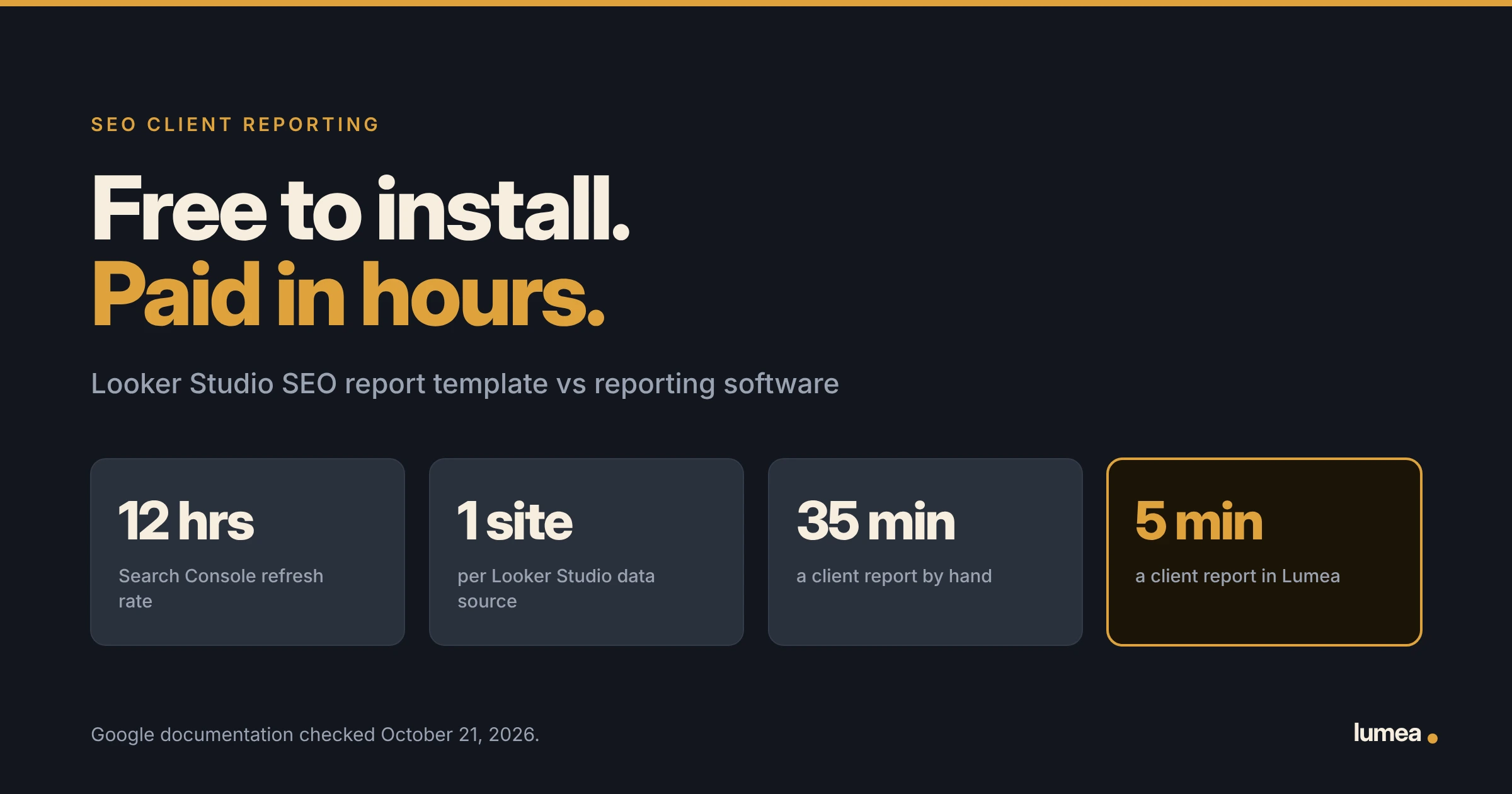

A Looker Studio SEO report template costs nothing to install. The hours are the price. You build one report per client, keep each one running, and still write the part your client cares about. In Lumea, a client report takes about 5 minutes. By hand, mine took 35.
Free is a strong word. It pulls a lot of agency owners in, and I was one of them. This page counts what a free report really costs you, using Google’s own rules, and what changes when the report builds itself.
What Is a Looker Studio SEO Report?
Looker Studio is Google’s free report builder. A Looker Studio SEO report template is a ready-made layout you copy, connect to a client’s Google accounts, and share. Most templates show the same three things: clicks, impressions, and traffic.
The first build feels great. You copy the template. You point it at the client’s Search Console. You point it at the client’s Analytics. The charts fill in. It looks sharp.
Then the month ends. And you do it again for the next client.
Give Looker Studio its due. The charts are clean. You can move anything anywhere. It costs nothing. If you want to dig into one site’s search data and slice it ten ways, few free tools beat it.
A client report is a different job. A client is not digging. A client wants to know what you did, what moved, and what happens next. That answer lives in three places, and only one of them is Google.
Is a Looker Studio SEO Report Template Really Free?
Yes. The free version of Looker Studio costs $0, and the templates cost $0. Google also sells Looker Studio Pro, which bills per user every month. Google says you pay for each license whether someone uses it or not.
For most small agencies, the free version is plenty. So the license is not your problem.
The bill shows up somewhere else. It shows up in your Saturday.
What Does It Take to Set Up One Client in Looker Studio?
Plan on six steps per client, and more if you want the full keyword view. Here is the list.
- Copy the template into your own account.
- Connect Search Console. You pick one site per data source.
- Pick your table. Google says a Search Console data source holds either Site Impression or URL Impression, and “a single data source can only use one of these.” Want both? Build two.
- Connect Google Analytics for the traffic charts.
- Fix what broke. Template charts point at fields your setup may not have.
- Share the link and teach the client how to read it.
Now do it nine more times. None of this is hard. It is slow. And it comes back every time you sign a client.
What Does a Looker Studio SEO Dashboard Leave Out?
Three things. Your client asks about all three.
- The work you did. Looker Studio reads Google. Google has no idea your writer published four pages last week. A dashboard cannot show work it never saw.
- The whole keyword list. Google holds some search terms back. Its own help page says “To protect user privacy, Search Analytics doesn’t show all data.” Some rows come back blank.
- Today’s numbers. Search Console data in Looker Studio refreshes every 12 hours. Google says “That rate can’t be changed.” Your client may open the report and see yesterday.
There is a fourth gap, and it is the big one. A dashboard has no room for what you are doing next month. Chart a drop with no plan under it and you have handed your client a reason to leave.
How Is SEO Reporting Software Different?
A dashboard starts with Google’s numbers and stops there. Reporting software starts with your work and adds the numbers on top. Same job, two tools.
| The job | Looker Studio | Reporting software like Lumea |
| Google Search numbers | Pulls from Search Console. Refreshes every 12 hours. | Pulls from Search Console |
| Website traffic | Pulls from Analytics | Pulls from Analytics |
| Full keyword list | Some queries hidden by Google | Same source, same hidden queries |
| Work your team finished | Not in Google, so not in the report | Finished items with live links |
| Leads the client got | No place for it | In the same report |
| Setup per client | One report and one data source per site | Add the client, connect Google |
| Build time each month | Your write-up, by hand | About 5 minutes |
| What it costs | Free version $0. Pro bills per user. | By client count, with unlimited seats |
Look at row three. Lumea pulls from Search Console too, so the queries Google hides are hidden in Lumea as well. Nobody gets around a Google rule. Anyone who tells you different is selling.
Rows four and five are where the two part ways. Those rows live in your SEO agency software, not in Google.
What Do the Hours Add Up To Across 10 Clients?
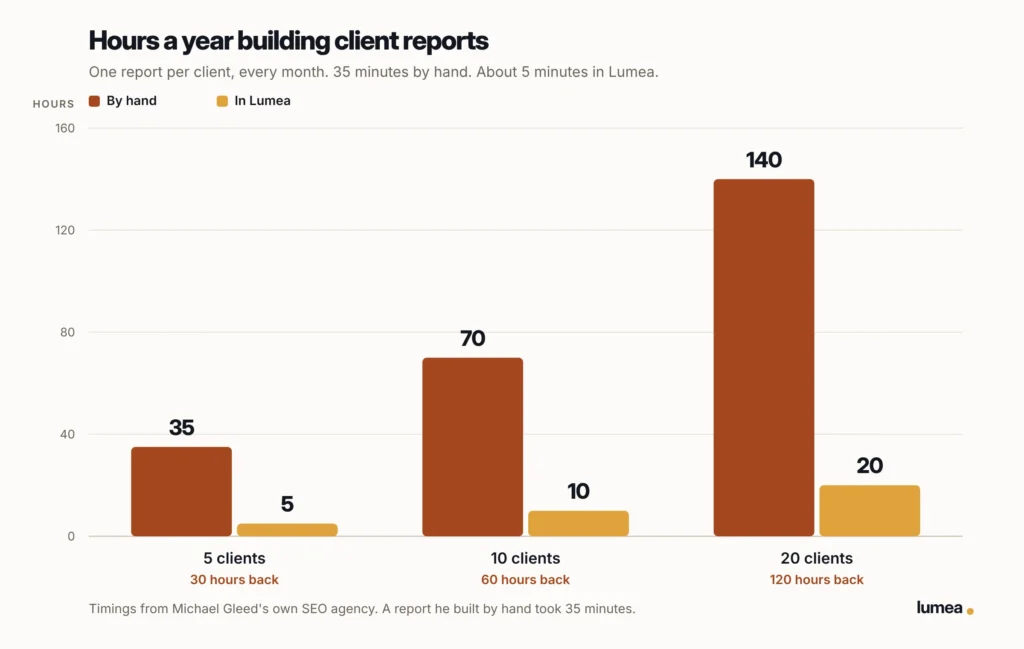
Thirty minutes per client, every single month. I built reports by hand for years. One took 35 minutes. In Lumea it takes about 5.
Run it against your own client list.
- 10 clients: 5 hours a month
- 20 clients: about 10 hours a month
- 10 clients for a year: 60 hours
Sixty hours is a week and a half of work. None of it went into SEO. It went into copying numbers from one screen to another.
Setup counts too. A Looker Studio build happens one time per client. The trouble is, one time per client keeps happening, because you keep signing clients.
Here is what my 35 minutes looked like. Open Search Console, pull clicks and impressions, type them in. Open Analytics, do it again. Scroll my task list for what we finished. Hunt for the live URLs. Write the summary. Export the PDF. Find the client’s email. Send.
Looker Studio deletes the typing. It does not touch the hunting, the writing, or the sending. Those were the slow parts.
What Should You Look For in SEO Reporting Software?
Six questions. Ask them of any tool you try, mine included.
- Does it show the work? Finished items with live links, not charts alone.
- Does it pull the numbers for you? Search Console and Analytics, with no copy and paste.
- Does it read a number the right way? Average position going from 6.7 to 2.3 is great news. A tool should say so, not draw a line going down.
- What does a bad month look like? Show the real number. Red ink makes a client panic over one slow month. Lumea uses a gray arrow instead, because you are the one sending the report.
- Does the client get one link? One link beats a PDF nobody opens.
- Does setup grow with your client list? Adding client eleven should take minutes, not an evening.
Lumea answers all six. So should anything else you try.
Count the Hours, Not the License Fee
Free is a price, and it is a good one. Hours are a price too, and most owners never add them up.
Lumea builds the client report from the work your team already logged. It pulls the Google numbers. You read it, add your plan for next month, and send one link. About 5 minutes, start to finish.
See how the whole report works on the SEO client reporting page, or go look at pricing. Either way, try it free for 14 days. No card.
Questions About Looker Studio SEO Reports
Is a Looker Studio SEO report template free?
Yes. The free version of Looker Studio costs nothing, and so do the templates. Google also sells Looker Studio Pro, billed per user each month. Google’s own documentation says you pay for those licenses whether or not they get used.
How often does a Looker Studio report update?
Search Console data refreshes every 12 hours, and Google says “That rate can’t be changed.” Google Analytics gives you a choice of every 1, 4, or 12 hours, with 12 as the default. So a report your client opens in the morning may hold yesterday’s numbers.
Why are some keywords missing from my Looker Studio report?
Google hides them on purpose. Its help page for the Search Console connector says “To protect user privacy, Search Analytics doesn’t show all data.” Rare searches get grouped into a row with a blank query. This happens in every tool pulling from Search Console, not only Looker Studio.
Can a Looker Studio report show the work my team finished?
Not on its own. Looker Studio reads what Google knows, and Google does not know your team published four pages or fixed a sitemap. You would type that in by hand each month, or leave it out.
How many Looker Studio reports do I need for 10 clients?
Ten, plus the data sources behind each one. A Search Console data source connects one site, and it holds either Site Impression or URL Impression. If you want both views for a client, that client needs two data sources.
Does Lumea replace Looker Studio?
They answer different questions. Lumea builds the monthly report your client reads, with the work, the numbers, and the leads in one place. A dashboard is for your own digging. The two do not read each other.