


This guide compares 7 SEO reporting tools for agencies, with prices checked on September 28, 2026. Michael Gleed wrote it. He runs his own SEO agency on Lumea Direct, the software he built for the business side.
Most SEO reporting software makes a clean report of Google numbers. The report goes out, the client nods, and nobody asks what the month cost you. A client can love every report and still lose you money.
What Is SEO Reporting Software?
SEO reporting software pulls a client’s search data into a report you send every month. Most tools connect to Search Console, Google Analytics, and Google Business Profile, then build a branded dashboard. Prices run from free to €699 a month, based on clients and data sources.
Every tool on this list does the core job. The differences are how they charge and what they leave out. Most stop at the numbers, with no record of the work your team finished.
What Should an SEO Report Show a Client?
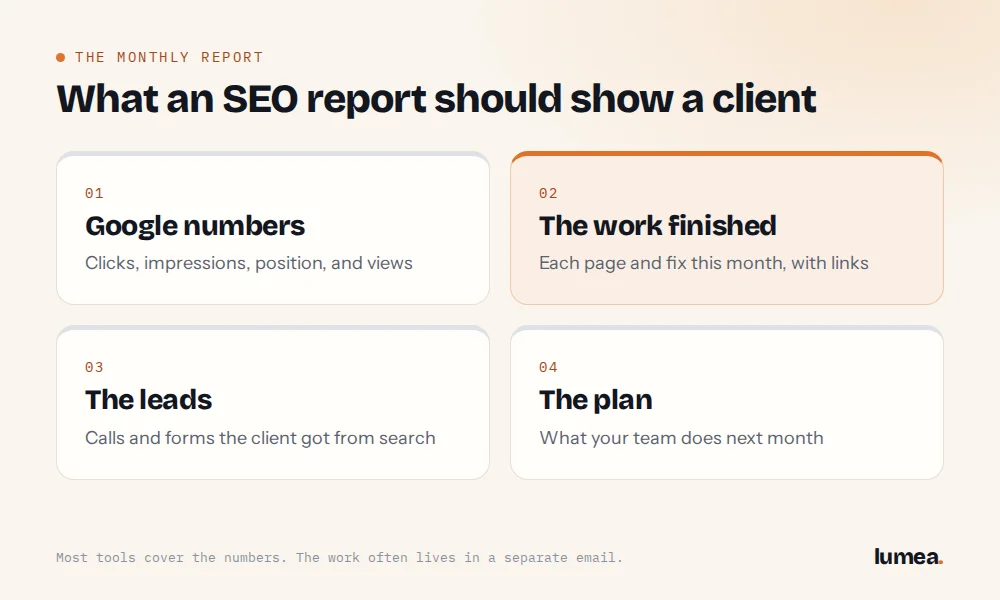
An SEO report should show 4 things: the numbers, the work, the leads, and the plan. A client pays for work, so the report has to prove it happened:
- Google numbers: clicks, impressions, average position, and profile views
- The work your team finished this month, with live links
- The leads the client got from search
- What your team will do next month
Most tools cover the first bullet well. The second one usually lives in an email you write by hand, next to the dashboard link.
A bad month belongs in the report too. Show the real number, say what caused it, and say what you’re doing next month.
What Are the Best SEO Reporting Tools for Agencies?
The best SEO reporting tools for agencies are AgencyAnalytics, DashThis, Swydo, Whatagraph, Databox, Google’s Data Studio, and Lumea Direct. The first 6 build reports from data sources. Lumea builds the report from the month’s work and the numbers together.
AgencyAnalytics
AgencyAnalytics is priced per client, at $20 per client a month billed yearly. It includes white-label reports, unlimited staff and client users, and 85-plus integrations. Rank tracking is an add-on at $41.67 a month for 500 keywords. It’s strong for agencies reporting on SEO, ads, and social together.
DashThis
DashThis charges by dashboard, from $39 a month billed yearly for 3 dashboards. The Professional plan covers 10 dashboards for $128 a month billed yearly, or $139 monthly. Every plan includes white label and unlimited users. One client usually means one dashboard.
Swydo
Swydo starts at $49 a month for 10 data sources, with unlimited users, dashboards, and reports. Each extra source costs $3.50 a month, up to 100 sources. It bills monthly, with no per-client fee. You pay for the accounts you connect.
Whatagraph
Whatagraph’s Max plan starts at €699 a month, billed yearly, with unlimited users and reports. It adds AI summaries and a customer success manager. The price puts it out of reach for most agencies under 20 clients.
Databox
Databox’s Agency plan starts at $79 a month billed yearly, with 20 data sources and unlimited users. Each client pack adds $20 a month for 1 client and 5 data sources. It’s flexible and general, so an SEO agency builds its own report layouts.
Google Data Studio
Google’s free report builder is listed on its pricing page as Data Studio. Most agencies know it as Looker Studio. It’s free for creators and viewers, and the Pro version is $9 per user per project a month. You build and fix every template yourself.
Lumea Direct
Lumea Direct builds the client report from the month’s finished work and the Google numbers. It’s priced by client count, from $143 a month, with unlimited seats. It also runs deliverables, time tracking, and profit per client. See the full tour of Lumea’s SEO agency management software.
How Much Does SEO Reporting Software Cost at 8 Clients?
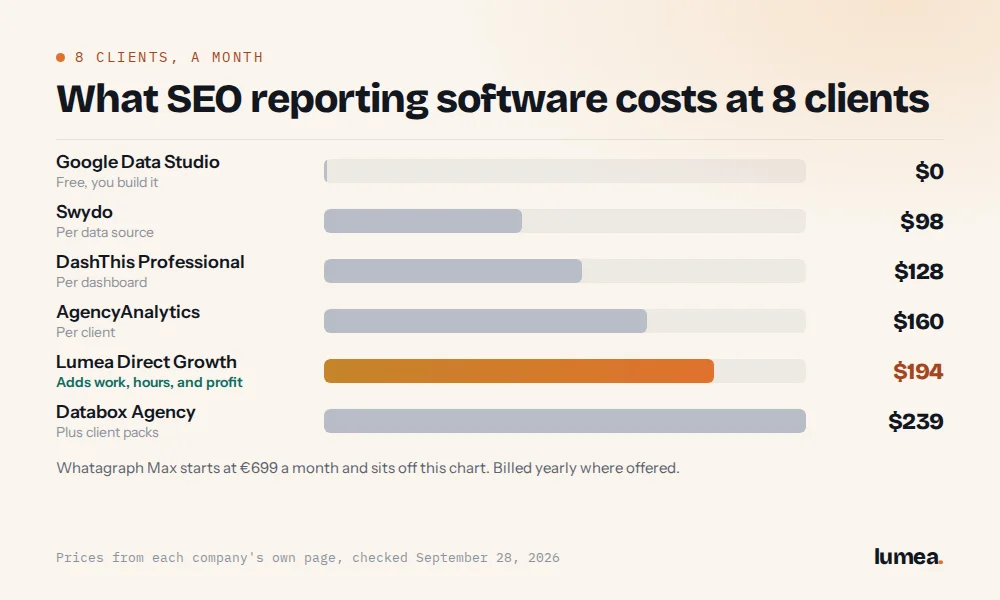
At 8 clients, SEO reporting software costs from $0 to about €699 a month. AgencyAnalytics comes to $160 a month billed yearly, and DashThis Professional to $128. Lumea Growth is $242 a month, or about $194 billed yearly, and it covers more than the report.
| Tool and plan | Priced by | Price on its own page | 8 clients a month |
| AgencyAnalytics | Client | $20 per client a month, billed yearly | $160 |
| DashThis Professional | Dashboard | $128 a month billed yearly for 10 dashboards, $139 monthly | $128 |
| Swydo | Data source | $49 a month for 10 data sources, $3.50 per extra source | $98 |
| Whatagraph Max | Plan | From €699 a month, billed yearly | From €699 |
| Databox Agency | Client pack | From $79 a month billed yearly, plus $20 per client pack | $239 |
| Google Data Studio | User, on Pro | Free, Pro $9 per user per project a month | $0 |
| Lumea Direct Growth | Client count | $242 a month for 4 to 8 clients, unlimited seats | $193.60 billed yearly |
Source: each company’s own pricing page, checked September 28, 2026. Swydo math assumes 3 data sources per client: Search Console, Google Analytics, and Business Profile. Prices change, so confirm on the linked page before you buy.
Lumea isn’t the cheapest report on the list. The other 6 stop at reporting, and Lumea’s price also covers the month’s work, the hours, and profit per client. See every plan on the Lumea Direct pricing page.
Where Do Most Reporting Tools Stop?
Most reporting tools stop at the report. They show what happened for the client, and nothing about what the client cost you. The work list, the hours, and the profit sit in other tools, or nowhere.
Here’s why it matters, with example data from the Northline Digital demo agency. Bayside Chiropractic and Miller Physical Therapy both pay $1,200 a month, and both reports can look great. Bayside took 30.8 hours and left $521 in client profit. Miller took 7 hours and left $1,027.
A reporting tool shows both clients winning. Hours tied to each client show which one pays you. For the whole stack by job, read our guide to the best SEO agency software.
Screen: client-profit-loop.mp4, framed, caption “Example data from the Northline Digital demo agency.”
How Does Lumea’s Client Report Work?
A client report takes about 5 minutes in Lumea, down from 35 by hand. Search Console numbers come in on their own. Google Business Profile numbers get typed in until Google approves the connection. The month’s finished work lands in the same report, with live links.
Lumea judges each number the right way. Average position going from 6.7 to 2.3 counts as better. A bad month shows a gray arrow with the real number, never red. You approve the report, send one link, and Lumea counts every open.
How Do You Choose SEO Reporting Software?
Choose SEO reporting software by how it charges, what it pulls in, and what it leaves out. Six questions sort most tools in under an hour:
- How does it charge? Per client, per dashboard, per data source, or by client count.
- Does it pull Search Console numbers on its own?
- Can the report show the work you finished, with live links?
- Does a bad month look honest, without red alarms?
- Can a client open it with one link and no login?
- Does it show what each client cost you in hours?
Test one real client during a free trial. AgencyAnalytics, DashThis, Swydo, and Lumea all offer 14 days free. By the second report, you’ll know which tool shows what you’re missing.
Send the Report, Then Check the Profit
Michael Gleed built Lumea Direct inside his own SEO agency. For years, his client facts sat across Drive, Docs, and Sheets. Now the report, the work, and the hours sit in one account, next to the profit on each client.
Start your 14-day free trial with no card and no sales call. Not ready yet? Run your top 3 clients through the free Client Profit Calculator first. You’ll know which clients to raise, keep, or drop.
Buttons: Start free trial (/pricing/#ld-plans)
Questions About SEO Reporting Software
What is the best tool for SEO reporting?
Start with Google Search Console, which is free. Search Console shows which queries bring people to a site, with impressions, clicks, and position on Google. A paid reporting tool turns those numbers into a branded monthly report. Pick the one priced for your client count.
How do you make an SEO report for a client?
Pull the month’s numbers, list the work you finished, and say what comes next. Google Search Console’s Performance report shows clicks, impressions, click-through rate, and average position. Compare each number with last month, and link every page you published.
Do AI Overviews show up in an SEO report?
Yes, inside the search numbers. Google’s guide to AI features covers AI Overviews and AI Mode. Sites shown there count in the Performance report, under the Web search type. So they’re part of your client’s Web totals.
How often should you send an SEO report?
Send it monthly, on the same day, to match the retainer. The SBA’s guide to managing your business tells owners to compare marketing costs to the revenue they bring in. A monthly report gives your client the numbers to make the check.